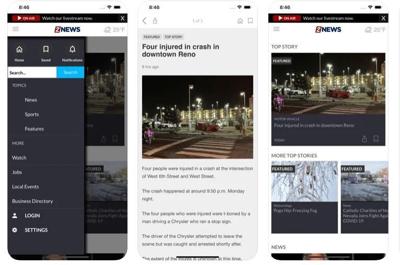

Now that so many of you have downloaded our new 2 News app, we want to give you a quick tour to make sure you know the features available to you.
When you open it up – our latest stories and any breaking news are right there at the top.
As you scroll down, there are more categories of specific coverage and video that may interest you. Just click to read or watch.
The current weather for your location is located right here at the top right, and a click of that information takes you to our weather page, with detailed forecasts written by our meteorologists, the latest television weather segment, forecasts and even interactive radar.
Clicking the little house icon at the top right on any screen takes you back to the home page.
These lines on the top left take you to the menu for the app and all of the content choices.
The thing i want to highlight here for you is this bell right at the top.
That's the way to access our notification settings where you can select the automatic news alerts you want to receive from us.
As you can see, there's breaking news, weather, traffic, local and COVID news. The choices are up to you to turn categories on or off with a touch.
To receive these notifications, you'll also have to make sure you have notifications enabled for our app on your device.
That's a quick tour of the new 2 News app.
We know change is hard, but we hope you like it and use it to keep getting Coverage You Can Count On 24/7 right in the palm of your hand.
And if you haven't downloaded it yet, please to go your app store right now and search for KTVN 2 News.
NEW 2 NEWS APP:
— KTVN 2 News (@KTVN) January 28, 2022
Now that so many of you have downloaded our new 2 News app, we want to give you a quick tour to make sure you know the features available to you. pic.twitter.com/7zio9ysc5z